The direct APK download route
- Tap Download Batwin APK. The button links directly to the Android package. Confirm the download or choose where to save it if your browser asks.
- Wait for the file to finish. Look for BatWin.apk in your browser’s Downloads list before opening it on a compatible Android device.
For help identifying the BATWIN website or finding its login controls, see the website and entry guide.
BATWIN APK details and offers
Version: 1.12.f4ui · APK size: 3.39 MB (3,389,944 bytes) · File: BatWin.apk · Checked: October 15, 2026
Free download, easy 3-minute install, and a ₹10,000 welcome bonus waiting for you.
📱 System Requirements
🎁 What You Get
Check the version and Android requirements
Use the details attached to the file you are about to obtain. A version number or file size from an old article may describe a different build.
| Detail | Where to check | What to compare |
|---|---|---|
| Version | The current download or release information; App info for your installed copy | Whether the offered build is an update for the same app |
| File size | The platform file details, if shown, and your browser’s download record | Whether the file finished downloading; equal sizes alone do not prove authenticity |
| Android compatibility | The platform’s requirements and Android installer | Your Android version and supported device type |
| Storage | Android Settings → Storage | Space for both the download and installed app |
An APK is an Android package. It cannot be installed on an iPhone or iPad. For browser access, follow the platform’s available web route.
Before opening the downloaded file
- Check the destination address and the source of the file. A familiar logo alone does not identify a publisher.
- Wait for the download to finish. Do not rename a partial download into an APK.
- Keep Android security checks enabled. Stop if the browser or installer reports a harmful file.
- Review permissions and the app identity shown by Android. File name and size are useful checks, but do not verify the file on their own.
BatWin.io is an independent guide and links to an externally hosted APK. The file details above were checked on October 15, 2026 and may change when the provider updates the download.
If the file does not arrive
| What you see | Next step |
|---|---|
| The browser does not start the download | Check for a save-file prompt and your browser’s Downloads list. If the link reports an error, try again later. |
| Download is paused or incomplete | Check the browser’s download list, connection and available storage; retry through the same verified entry. |
| The download finished but you cannot find it | Open the browser’s Downloads list or your Android Files app and look for BatWin.apk. |
| The file is present but installation fails | Follow the installation error guide with the exact message shown. |
Getting an update
Start with the update option inside your existing app, if available, or the same platform download route. Compare the app identity before accepting an update. Do not uninstall a working installation simply because a downloaded package is rejected: an incompatible build or signing mismatch may need publisher support.
The update and reinstall section explains the difference and what to check before removing an app.
Mobile screen examples
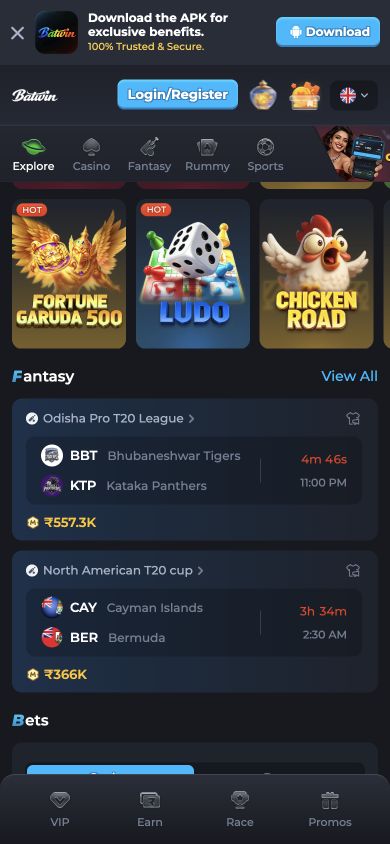
Public mobile website screenshots captured September 23, 2026. These are dated interface examples, not an installed APK test or a live event or offer feed.
Bonus and withdrawal information
- Your ₹10,000 welcome bonus is credited automatically on your first deposit.
- Bonus credited instantly on first deposit!
- KYC is typically approved within 1–2 hours.
- After KYC, withdraw in under 3 minutes via UPI.
- UPI withdrawals typically process within 2–5 minutes.
- Bank transfers can take up to 24 hours.
The entire process — download, enable unknown sources, install, and register — takes approximately 3–5 minutes on a 4G connection. Installation itself takes only 15–30 seconds.
Read the platform's current terms and see the bonus guide, KYC guide and withdrawal guide for these account tasks.
Frequently asked questions
BatWin.io is an independent affiliate guide. We may earn a commission through platform links. Account access, game availability and paid participation are handled by the platform.